API Documentation

Integrate install attribution and dynamic links into your mobile app with 2 HTTP API calls.

Base URL

https://api.linktrace.in

Your API Key

your-api-key(issued once you sign up)

Integration Overview

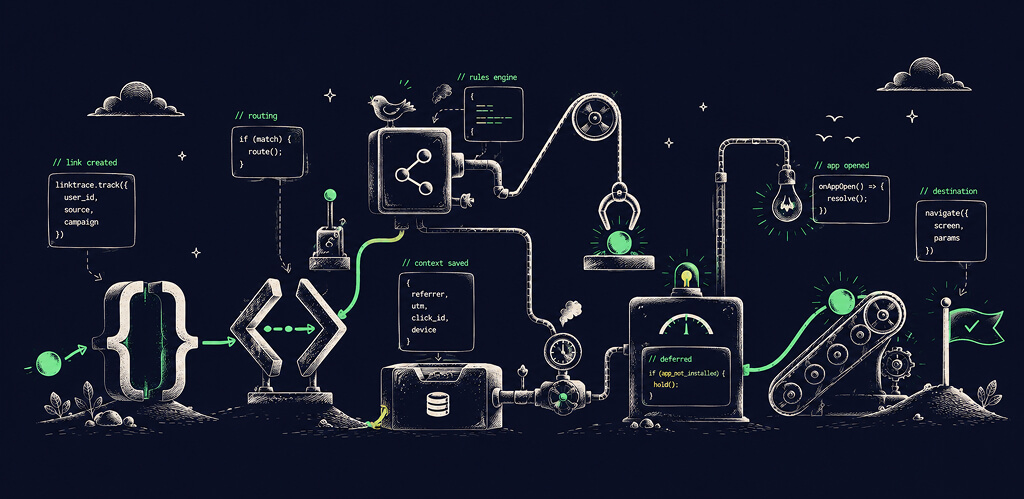
Two API calls are all you need. Here is the full flow:

1

Generate a Dynamic Link

Call POST /api/v1/referral-links to create a unique traceable link. Attach it to a referrer (a user, a campaign, or a channel) by setting referrerIdentifier.

2

Share the Link

Your user or campaign distributes this link. When someone clicks it, LinkTrace records the referral data.

3

Track the Install

After a new user installs and signs up, call POST /api/v1/attributions with their userId. LinkTrace resolves which link they came from and returns the full referral data.

Track App Installs

POST

Call this endpoint from your app after a new user completes signup. Pass their unique identifier (userId) — this can be your internal user ID, device ID, or any stable identifier.

https://api.linktrace.in/api/v1/attributions
How Attribution Works
  • First-touch attribution — LinkTrace attributes an install to the first dynamic link the user clicked.
  • Attribution window — 24 hours from the link click. If a user installs within that window, the install is attributed.
  • Deterministic matching — Attribution is based on the device clicking the link, not probabilistic fingerprinting.
  • Custom payload passthrough — Any customPayload fields you set on the link are returned in the attribution response.

Headers

HeaderValueRequired
Content-Typeapplication/jsonYes
x-api-keyyour-api-keyYes

Example Payload

json
{
  "userId": "user_275"
}

Integrate with an AI Coding Assistant

Copy this prompt and paste it into your AI coding tool. It includes your API key and full integration context — the assistant will ask the right questions and generate code tailored to your stack.

ClaudeCursorCopilotWindsurf

Platform Integration Examples

kotlin
val client = OkHttpClient()
val mediaType = "application/json".toMediaType()
val body = "{
    \"userId\": \"user_275\"
}".toRequestBody(mediaType)
val request = Request.Builder()
    .url("https://api.linktrace.in/api/v1/attributions")
    .post(body)
    .addHeader("Content-Type", "application/json")
    .addHeader("x-api-key", "your-api-key")
    .build()
val response = client.newCall(request).execute()

Best Practices

Security

  • Store your x-api-key in environment variables or your platform's secure credential store. Never hardcode it in client-side JavaScript or commit it to version control.
  • All API calls must be made over HTTPS. The LinkTrace API does not accept plain HTTP requests.
  • The attribution API is designed to be called from your mobile app after the signup flow completes.
  • Validate that the userId you pass is a stable, non-PII identifier. Avoid passing raw email addresses or phone numbers.

When to Call Each Endpoint

  • Call POST /api/v1/attributions as soon as possible after signup completes — ideally in the same request flow as account creation. Delaying this call does not lose attribution (the 24-hour window is generous), but it creates a gap in your data.
  • Call POST /api/v1/referral-links when a user initiates a share action, or server-side when you create a campaign link. Do not pre-generate thousands of links in bulk — only generate links you intend to distribute.
  • Do not call the attribution endpoint on every app launch — only on first signup. Repeated calls for the same userId will not create duplicate attributions (LinkTrace deduplicates), but they do count against your attribution quota.

Naming Conventions

  • Use snake_case for source and campaign values. Example: in_app_referral, facebook_ad_spring_2025.
  • Keep referrerIdentifier values short and opaque(eg.- linktrace_blog_post_2026, linktrace_youtube) — your internal user ID works well in case of referral programs.
  • Use consistent source values across all your links. Define a short list (e.g., home_tab, settings, email, push) and stick to it — inconsistent values fragment your attribution reports.
  • Set meaningful campaign names that include the time period if relevant. Example: referral_march_2026 rather than just referral.

Debugging

  • Test with environment: "stage" before deploying to production. Stage links route to your staging store URLs, which you can configure in Settings without affecting live users.
  • A response with data.attributed: false means no matching link click was found for the device within the attribution window. This is expected for organic installs (users who did not click a link).
  • Check your API key is correct if you receive a 401 Unauthorized response. Your key is available in Settings → API Key.
  • If customPayload fields are missing from the attribution response, verify that the fields were set on the originating link — the payload is link-level data, not passed in the attribution call.

Need Help?

Running into an issue with your integration? Send us an email — we respond within 24 hours on weekdays.

contact@linktrace.in